




Why Multifactor Authentication Matters in Modern Accounting?

Implementing Multi-Factor Authentication (MFA) is crucial for Philippine accounting firms using SaaS accounting systems. MFA strengthens security by preventing unauthorized access to both financial and personal data, supporting compliance with the Data Privacy Act (DPA) and aligning with global standards like ISO 27001 and NIST. By adding this extra layer of protection, firms can significantly reduce the risk of data breaches while ensuring secure, reliable accounting operations and keeping systems secure against hackers and unauthorized access.
What is Multifactor Authentication?
Multifactor Authentication (MFA) is a security system that requires a user to provide more than one method of verification to prove their identity before logging in to an account or system. This process is also often referred to as two-step verification. MFA is a simple, effective way to keep hackers out, even if they manage to get your password.
Unlike relying solely on a password, MFA incorporates multiple types of authentication, making it significantly harder for unauthorized individuals to gain access. MFA factors generally fall into three categories:
- Something You Know: This typically includes a password or a PIN.
- Something You Have: This factor might be a smartphone, hardware token, or security key. This includes text message codes, email codes, or codes generated by authentication apps (like Google Authenticator or Microsoft Authenticator).
- Something You Are: This involves biometric data, such as a fingerprint or facial recognition.
This layered approach dramatically enhances security, reducing the impact of password-based attacks like brute-force or credential stuffing. According to guidance from the Cybersecurity and Infrastructure Agency (CISA) and backed by Microsoft research, enabling MFA can prevent 99% of automated hacking attacks. (Source from National Cybersecurity Alliance)
The Importance of MFA in Accounting
The need for multifactor authentication is particularly critical within the accounting sector (mfa accounting) because accountants and bookkeepers handle highly sensitive data, making them prime targets for cybercriminals.
1. Enhanced Security and Protection of Sensitive Client Data
Accountants routinely handle confidential client information, including financial statements, tax records, and Social Security Numbers. This critical data is a prime target for cybercriminals. By integrating MFA, firms safeguard this data by adding a crucial second layer of protection. If an attacker compromises a password, MFA ensures they still cannot access the account without the second verification factor, such as a fingerprint or a unique code sent to a mobile device. This is critical considering that over 2+ billion records were breached in the first half of 2024 alone.
2. Compliance and Audit Requirements
Adhering to strict regulatory standards is crucial in the finance and accounting industries. In the Philippines, the Data Privacy Act of 2012 (DPA) mandates organizations to implement strong security controls to safeguard personal and sensitive financial information.
Compliance with the DPA includes enforcing proper data handling, secure user authentication, breach prevention measures, and accountability requirements. Following these regulations helps businesses protect customer data, maintain trust, and avoid penalties from the National Privacy Commission (NPC).
3. Reducing the Risk of Fraud and Cyber Threats
Fraud is a significant concern, often centered around compromised passwords and banking details. MFA minimizes this risk by adding extra hurdles for criminals. Even if a fraudster obtains login credentials, the additional authentication steps prevent unauthorized activities because they lack the required MFA code. MFA is an effective measure against cyber threats like phishing and social engineering.
4. Building and Enhancing Client Trust
Clients entrust accountants with their most confidential information. By actively implementing MFA and showcasing strict security protocols, firms demonstrate their commitment to safeguarding this sensitive information, which can strengthen client relationships and enhance the organization’s reputation.
Multifactor Authentication in N3 AI Accounting (formerly QNE AI Cloud Accounting)
N3 AI Accounting (formerly QNE AI Cloud Accounting) Software, designed to meet the requirements of SMEs, provides Multi-User Security which allows multiple users to securely access the system while protecting data through user-level controls and access restrictions.
N3 AI Accounting (formerly QNE AI Cloud Accounting) enhances security by providing built-in Multifactor Authentication options:
- Availability: MFA is a security feature available starting from the Essential Plan up to higher-tier plans.
- Purpose: MFA enhances account security by requiring a verification code in addition to your password, preventing unauthorized access even if login credentials are compromised.
- Supported Methods: QNE AI Cloud Accounting supports both authenticator app–based codes and email verification to give users flexibility and added protection. For users who prefer not to use an authenticator app, email verification provides a simpler alternative without compromising security.
How to Enable and Use MFA in N3 AI Accounting (formerly QNE AI Cloud Accounting)?
The process to enable and use MFA is straightforward:
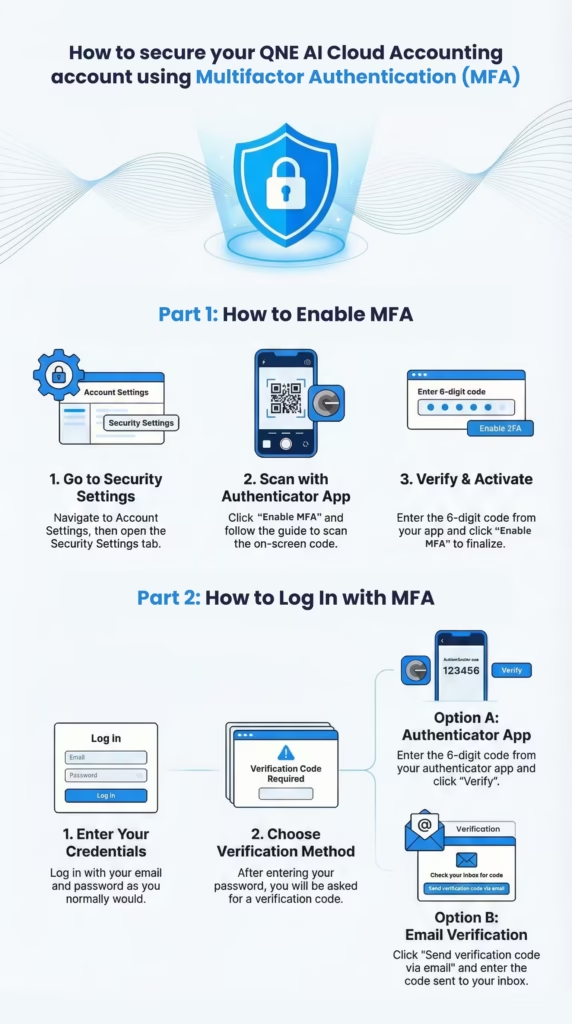
- Enabling MFA: Users navigate to Account Settings, then open Security Settings, and click Enable MFA under Multifactor Authentication. This prompts a guide to download an authenticator app (which generates time-based codes) and scan a QR code. After entering the 6-digit code from the authenticator app, the user clicks Enable MFA to finalize activation.
- Logging In with MFA: After entering their email and password on the login screen, users must enter the 6-digit verification code displayed in their authenticator app.
- Using Email Verification (Alternative Method): If a user cannot access their authenticator app, they can click Send verification code via email instead on the MFA login screen. A verification code is then sent to their email, which expires in 10 minutes.
- Security Notifications: Enabling or disabling Multifactor Authentication triggers a notification email to the user.
This MFA functionality helps safeguard the system in practical situations such as when accounting teams log in remotely or when an employee changes mobile phones, allowing MFA to be easily disabled and re-enabled to pair the new device.
Organization-Level MFA Enforcement
Enhance your company’s security by requiring all users within your organization to use Multifactor authentication (MFA) when accessing their accounts. With this feature, administrators can enforce a mandatory MFA policy across all users, ensuring consistent compliance with security standards and reducing the risk of unauthorized access. Ideal for firms handling sensitive financial data or operating under strict data protection requirements.
Ready to Secure Your Future and Automate Your Practice?
Stop managing multiple clients with tedious manual tasks and start utilizing the power of AI to streamline your practice. N3 AI Accounting (formerly QNE AI Cloud Accounting) automates repetitive tasks like data entry and bank reconciliation, allowing you to focus on strategic financial planning. Harness the power of Quinny AI Report Analyzer and the Qbot Financial Advisor to deliver instant, insightful reports to your clients 24/7.
Upgrade your financial management with a user-friendly and accessible solution that ensures compliance. Get real-time financial insights, manage your inventory, budgets, and multi-currency transactions efficiently (depending on your plan), and ensure all data is protected with Multifactor Authentication
Unlock the benefits of AI, automation, and uncompromising security today. Sign Up for Free or Book an Appointment to Explore N3 AI Accounting (formerly QNE AI Cloud Accounting)!
Frequently Asked Questions (FAQs)
What is Multifactor Authentication (MFA)?
MFA, also called MFA or two-step verification, is a security system requiring more than one method of verification to log in. It combines your password with a second factor, such as a code from an authenticator app or a biometric scan, adding an extra layer of protection.
How does Multifactor Authentication work?
MFA requires two or more verification factors:
Something You Know: Password or PIN.
Something You Have: Smartphone, security key, or authenticator app.
Something You Are: Biometric data like fingerprints or facial recognition.
Users log in with their username and password, then complete a second step to verify their identity.
Why is Multifactor Authentication important for accounting firms and businesses?
MFA enhances security and protects sensitive financial data. Key benefits include:
Data Protection: Safeguards client personal and tax information.
Enhanced Security: Prevents unauthorized access even if passwords are stolen.
Regulatory Compliance: Supports Data Privacy Act (DPA) and aligning with global standards like ISO 27001 and NIST
Fraud Prevention: Reduces risk of fraudulent activities.
Client Trust: Shows commitment to secure financial management.
How effective is Multifactor Authentication against cyber threats?
MFA prevents 99% of automated hacking attacks, according to cybersecurity research by Microsoft and CISA.
What MFA methods does N3 AI Accounting (formerly QNE AI Cloud Accounting) support?
N3 AI Accounting (formerly QNE AI Cloud Accounting) supports authenticator app codes and email verification for flexible and secure login