




Received a BIR LOA? Here’s How to Validate It Using the LOA Verifier
- Published on
Why Every Business Must Validate a BIR Letter of Authority?
To enhance transparency and protect businesses from unauthorized audit activities, the Bureau of Internal Revenue (BIR) has launched a new digital verification tool. This feature, known as the “LOA Verifier,” is accessible through the bureau’s official “Chatbot REVIE.” As released in a recent Revenue Memorandum Circular (RMC) No. 005-2026, the official BIR issuance announcing this new system, the primary purpose of this tool is to provide taxpayers with an official and reliable method to validate the authenticity of a Letter of Authority (LOA) they have received.
What is a BIR Letter of Authority (LOA)?
Within the context of this new verification system, a Letter of Authority (LOA) is an official document issued by the BIR that is subject to authenticity verification. The BIR’s goal in providing a verification channel is to protect taxpayers from “unauthorized audit activities,” which necessitates a reliable and accessible method for confirming that an LOA is legitimate.
Why Verifying a BIR LOA is Critical
Verifying an LOA is a crucial step for any taxpayer undergoing an audit. The BIR has established this official process for several key reasons:
- To protect taxpayers from unauthorized individuals or fraudulent audit activities.
- To enhance transparency and accountability throughout the audit process.
- To ensure timely validation of an LOA’s authenticity through a quick and accessible digital tool.
To establish a single, reliable point of truth for verification, preventing confusion from unofficial channels or potential scams.
What is the BIR LOA Verifier?
The LOA Verifier is a new feature launched by the BIR, designed as a reliable and secure verification mechanism. It is integrated within “Chatbot REVIE,” the official chatbot on the BIR website (www.bir.gov.ph). This tool allows any taxpayer to check the authenticity of an LOA by inputting specific details from the document into the system for instant verification.
How to Use the BIR LOA Verifier to Check an LOA
The verification process is straightforward and can be completed in minutes. Ensure you have the necessary information from your LOA before you begin.
Information Needed to Verify a BIR LOA
To use the LOA Verifier, you must provide the following information exactly as it appears on the Letter of Authority:
- Taxpayer’s Name
- Taxpayer Identification Number (TIN)
- LOA Case Number
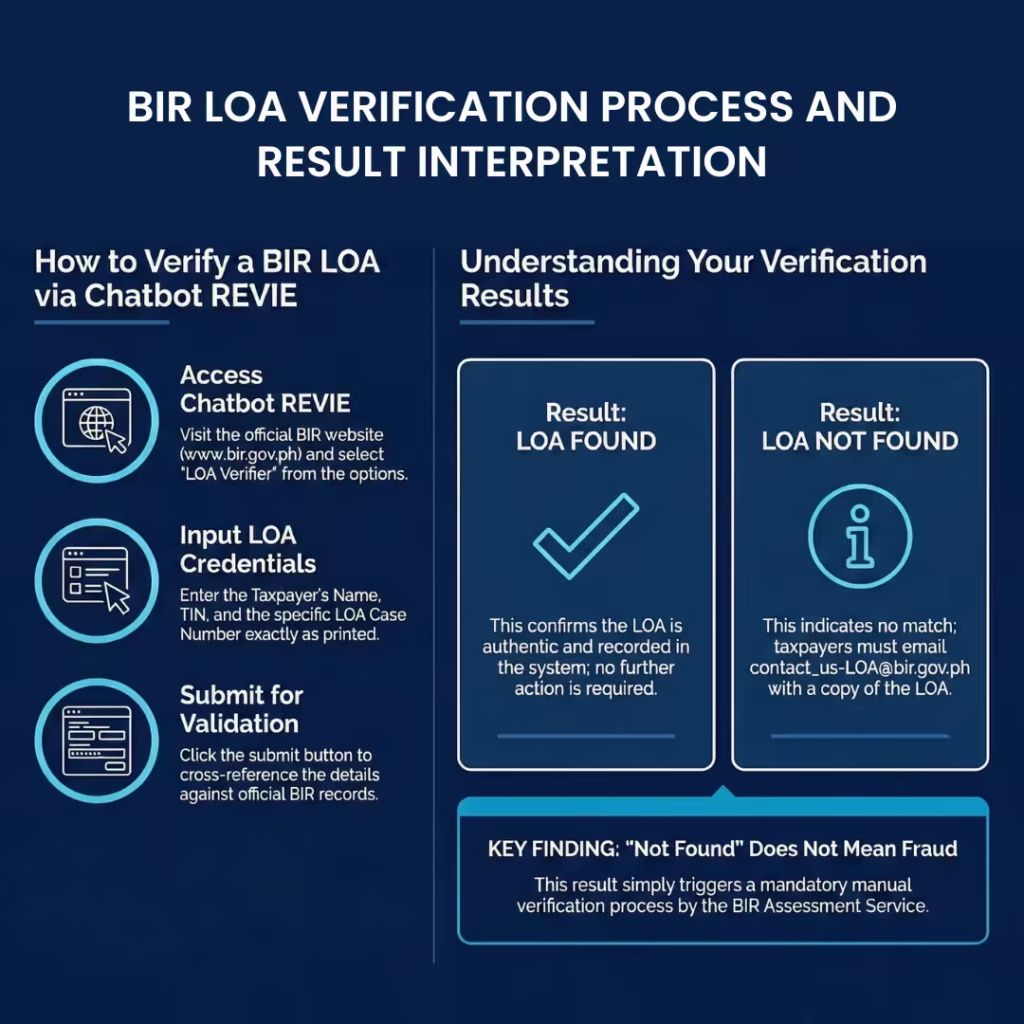
Step-by-Step Verification Process via Chatbot REVIE
Follow these steps to check your LOA using the online tool:
- Access Chatbot REVIE through the official BIR Website (www.bir.gov.ph).
- Select LOA Verifier from the dropdown list of options.
- Enter the required details: Name of the Taxpayer, TIN, and LOA Case Number.
- Click the SUBMIT button.
How to Interpret the Results
The system will provide one of two clear responses:
- If the details match an official record, the system will respond: “LOA FOUND.” This confirms the authenticity of your LOA, and no further action is required.
If the details do not match any record in the system, the response will be: “LOA NOT FOUND.” This indicates that you must proceed to the next step for manual verification.
What to Do If a BIR LOA Cannot Be Verified Online
Receiving an “LOA NOT FOUND” result from the online verifier does not automatically mean the document is fraudulent. It simply means a manual verification process must be initiated.
Your Next Step: Requesting Manual Verification via Email
If the online tool cannot find your LOA, you must send an email to the BIR for further verification.
Send your request to the official email address: [email protected].
Your email must include the following details and attachments:
- A scanned copy of the Letter of Authority (LOA) must be attached (e.g., as a PDF or image file).
- TIN
- Name of the Taxpayer
- LOA Case Number
- Issuing Office (e.g., RR No. / RDO No. / LTS / NID / etc.)
The BIR’s Response Process
Once you send the email with all required information, the BIR will follow a formal procedure:
- You will automatically receive a standard acknowledgement reply confirming your request has been received.
- Your request will be logged, monitored, and tracked by the BIR Assessment Service and the Customer Assistance Division.
- The Assessment Service will validate the LOA’s authenticity, coordinating with other concerned BIR offices if necessary.
An official response confirming the status of your LOA will be prepared and sent back to you from the [email protected] email address. This response will be issued within three (3) working days from the BIR’s receipt of your complete request.
Protect Your Business by Verifying Every BIR LOA
The introduction of the LOA Verifier is a significant step towards greater taxpayer protection and transparency. All businesses should make it a standard practice to use this official channel via Chatbot REVIE as the first step in validating any Letter of Authority. This tool represents a fundamental part of the BIR’s modern, digital-first approach to tax administration, empowering taxpayers with a level of security and direct control that was not previously possible. By using it, you ensure that you are engaging only with legitimate and authorized BIR audit activities, safeguarding your business and promoting compliance.
Frequently Asked Questions (FAQs)
What is a BIR LOA?
A BIR LOA (Letter of Authority) is an official document issued by the Bureau of Internal Revenue authorizing a tax audit or examination of a taxpayer. Taxpayers are required to verify a LOA to protect against unauthorized or fraudulent audit activities.
Why is it important to verify a BIR LOA?
Verifying a BIR LOA is important to confirm that the audit is officially authorized by the BIR. This helps protect taxpayers from fraudulent audits, ensures transparency, and provides assurance that the audit process follows official BIR procedures.
What is the BIR LOA Verifier?
The BIR LOA Verifier is an official digital verification tool launched by the BIR and accessed through Chatbot REVIE on the BIR website. It allows taxpayers to check the authenticity of a LOA using details from the document.
How does the BIR LOA Verifier work?
The LOA Verifier works by matching the taxpayer’s details entered into Chatbot REVIE against official BIR records. If the details match, the system confirms the LOA as valid. If not, the system instructs the taxpayer to request manual verification.
What information is required to verify a BIR LOA online?
To verify a LOA online, taxpayers must enter the following details exactly as shown on the Letter of Authority:
- Taxpayer’s name
- Taxpayer Identification Number (TIN)
- LOA case number