









N3 AI Accounting

AI Accounting Software Sparks the Shift Among Malaysian Businesses

AI accounting software is changing how Malaysian businesses manage finances through automated data entry, document processing, reconciliation, and financial analysis. See how N3 AI Accounting brings these capabilities together to reduce manual work, streamline accounting, and deliver faster financial insights.

What Is AI Accounting Software?

AI Accounting Software uses machine learning and natural language processing to automate bookkeeping. It works like a smart assistant — scanning receipts, reconciling accounts, and analyzing your finances. That frees up accountants to focus on advice, not data entry.

Why Is AI Accounting Software Different From Traditional Accounting Software?

AI accounting software compared with traditional accounting software workflow

Traditional accounting software stores and organizes what you enter — accurate, but only as fast as manual data entry allows. It waits for instructions.

AI Accounting Software changes the starting point. It reads documents for you, learns your patterns over time, and can answer questions instead of just generating reports you have to interpret. The real difference isn't speed alone — it's that the software adapts to your business, instead of requiring your business to adapt to it.

AspectTraditional Accounting SoftwareAI Accounting Software
Data EntryManual, entered line by line.Automated—reads receipts, bills, and bank statements.
Transaction MatchingManually reconciled by a person.AI matches and reconciles transactions automatically.
Getting AnswersYou build or export a report.Ask a question in plain language and receive an instant answer.
Error & Anomaly DetectionIssues are caught only if someone notices them.AI flags unusual transactions automatically as they happen.
Accuracy Over TimeRemains the same unless processes are manually improved.Continuously improves by learning your vendors and transaction patterns.
SupportEmail or ticket-based support.Instant, in-app AI assistance whenever you need it.
Compliance UpdatesRules and tax changes are tracked and applied manually.Built-in updates keep pace with regulatory changes (e.g., LHDN, SST).
Role of the UserActs as the operator who performs the accounting work.Acts as the reviewer who verifies and directs AI-generated work.

Key Takeaway: Traditional systems are passive — they just record. AI accounting software is active. It reads, learns, and gives you insights in real time.

How Does AI Work in Accounting?

In practice, AI in accounting runs on a few core techniques working together:

Software AI accounting software using optical character recognition (OCR) to capture invoice data

Optical character recognition (OCR)

Optical Character Recognition (OCR) reads your invoices and receipts automatically. It pulls out vendor names, amounts, dates, and SST details — no manual typing needed.

Machine Learning - AI Accounting Software

Machine learning

Studies past transactions to predict how a new one should be categorized, and flags entries that don't fit the pattern.

AI accounting software using natural language processing (NLP) for user queries

Natural language processing (NLP)

Lets you ask questions in plain English, like "what's my cash flow this month?", and get a direct answer instead of a report to decode.

AI accounting software automating bookkeeping and repetitive accounting tasks

Automation

Triggers routine actions (reminders, reconciliations, approvals) without someone manually starting them each time.

Together, these move accounting from recording what happened to understanding what's happening — and what to do next.

What Problems Does AI Accounting Software Solve?

Manual data entry that eats hours every week

Missed or duplicate transactions during reconciliation

Delayed visibility into cash flow, profitability, or risk

Repetitive support questions that slow teams down

Inconsistent categorization across multiple staff members or clients

Compliance requirements (e-Invoicing, SST) that are easy to get wrong when done manually

What Are the Core AI Features to Look For?
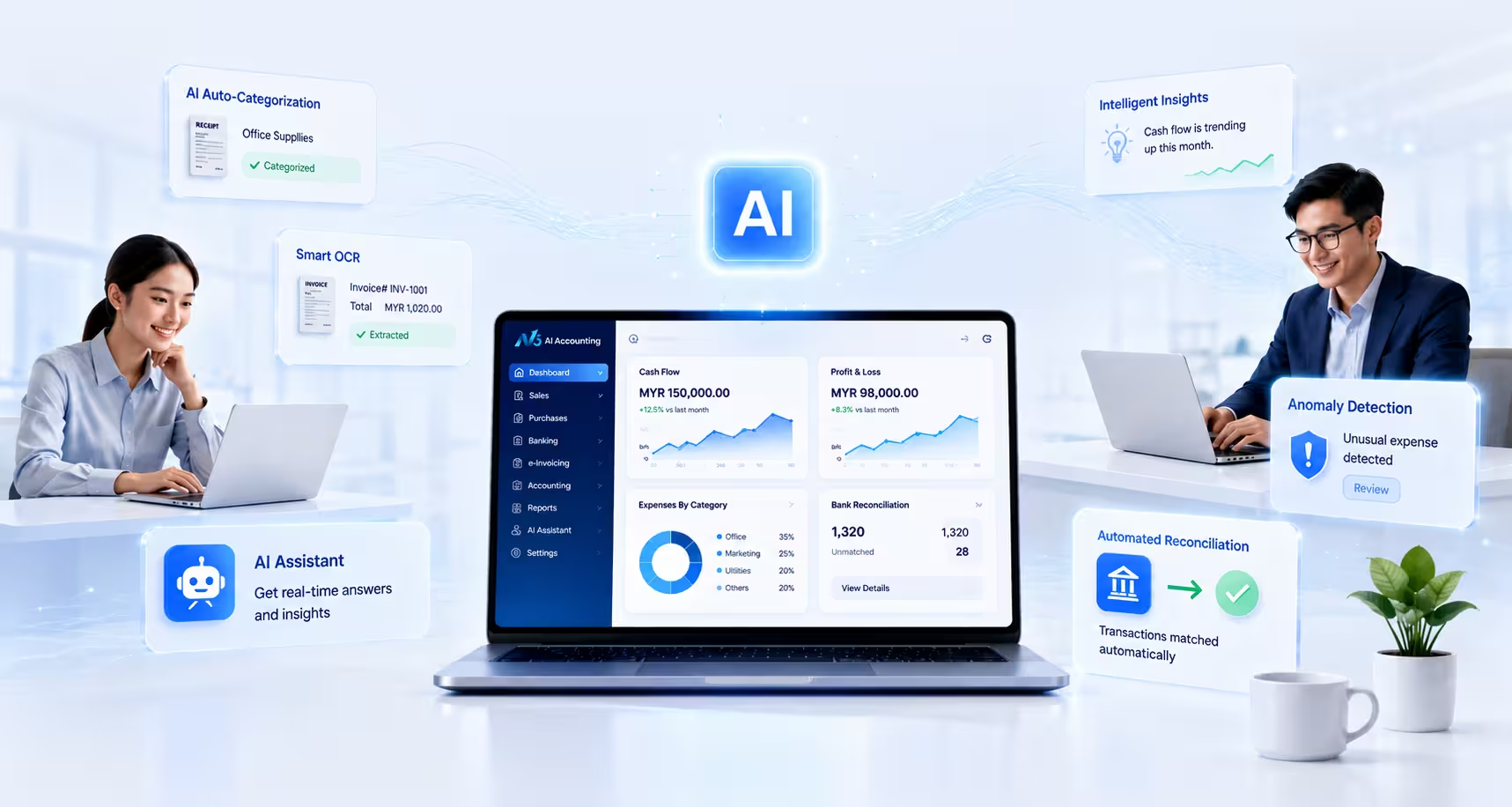
What Are the Core AI Features to Look For

Which Businesses Should Use AI Accounting Software?

Business owners

Who want real-time visibility into cash flow and performance without hiring a full finance team

Corporate accountants

Who need faster month-end closes and less manual data entry

Accounting and bookkeeping firms

Managing multiple clients who want to scale service without scaling headcount.

How Does N3 AI Accounting Apply These AI Capabilities?

This is where N3 AI Accounting puts it into action. Every feature below is live in the platform today. It's built for Malaysian accountants, SMEs, and bookkeepers — and aligned with LHDN, MyInvois, and SST rules.

Quinny AI — The AI Behind Your Numbers

Quinny AI is the brain behind your numbers. It turns raw data into clear insights — flagging risks, checking your KPIs, and answering your questions in plain language.

Ask in plain language

"Show liquidity ratios last month" or "Generate a 30-day cash flow forecast" returns structured answers instantly.

Prompt suggestions

Select a focus area (liquidity, profitability, cash flow, efficiency, solvency) and get ready-made ratios and interpretations.

Instant financial insight cards

Financial Performance Packs, AR Outstanding Reports, and Cash Flow Insights generated automatically.

Eliminates manual data entry

Reduces repetitive encoding and human error.

MCP Connections — Bring Your AI Tools Into Your Books

N3 AI Accounting supports the Model Context Protocol (MCP). This lets your financial data talk securely with outside AI tools — so everything works together as one system.

Connect once, act everywhere

Let AI agents create invoices, check payment status, or pull reports without switching tabs.

Plain-language execution

Instruct a connected AI assistant to complete a task, and it executes directly inside N3.

Built for extensibility

As your tech stack grows, N3 stays connected to it.

N3 AI accounting software connected to external business systems using MCP

Qbot AI Support — Get Help the Moment You Need It

Qbot AI Support is your always-on first line of help — trained specifically on N3 AI Accounting workflows and Malaysian compliance rules.

Context-aware troubleshooting

Grounded answers based on N3's actual documentation.

Faster resolution, less waiting

Reduces reliance on email tickets.

Available where you work

Accessible inside the platform, no need to leave your session.

QBot AI support assistant in N3 AI accounting software

Qbot Chatbot — Your Everyday Accounting Assistant

Where Qbot AI Support solves problems, Qbot Chatbot helps you get things done — a conversational assistant for day-to-day tasks like finding a transaction or checking a client's balance.

Natural conversation, real actions

Get pointed directly to the answer or the action.

Reduces clicks, not just questions

Shortcuts navigation across accounts, clients, and modules.

Learns your common requests

Becomes more useful the more your team uses it.

Accounting Software Malaysia

AI QuickScan — From Document to Data in Seconds

AI QuickScan is built for Malaysian businesses. It reads SST fields and local vendor formats from PDFs or photos — helping keep you LHDN-compliant.
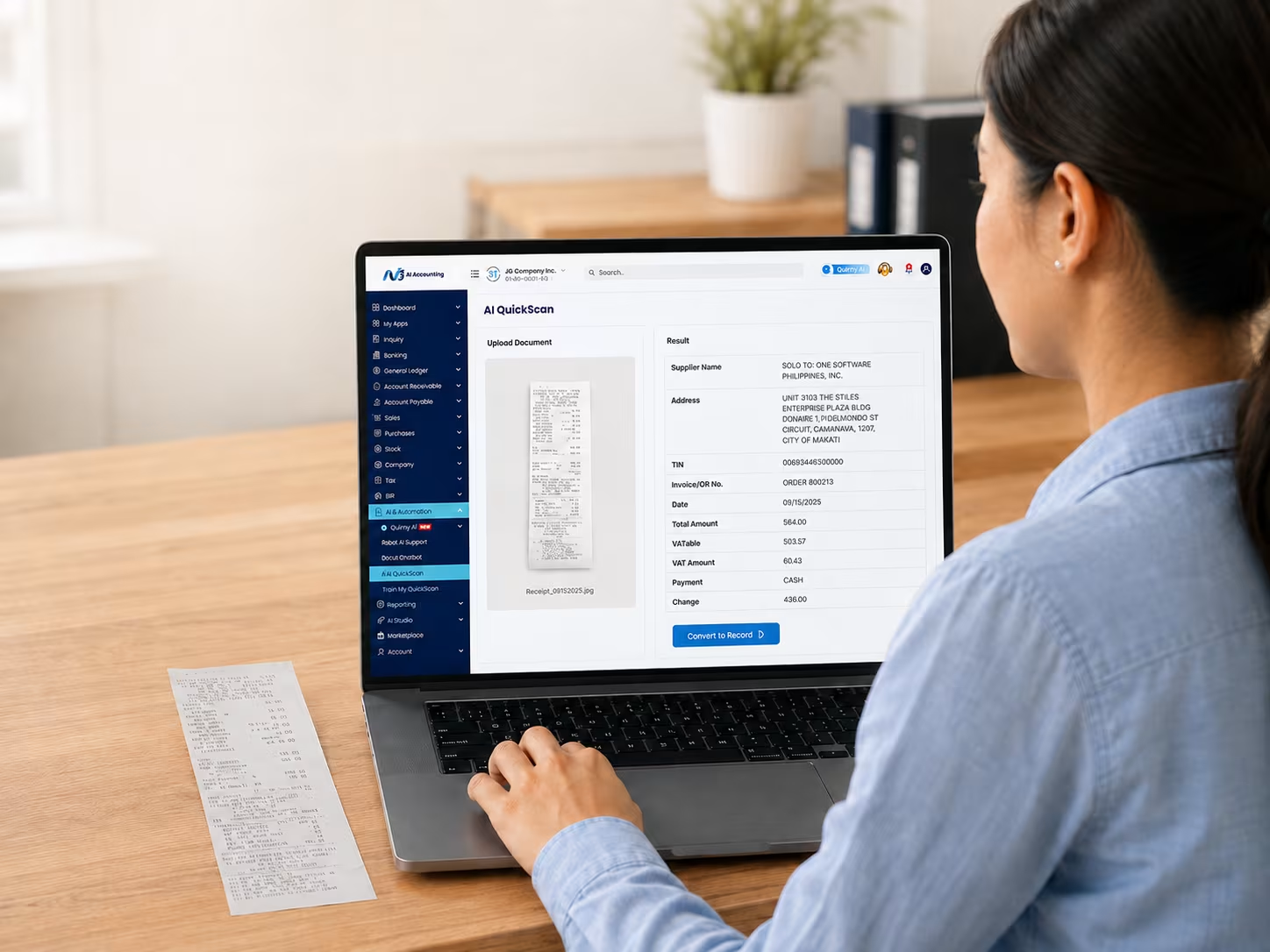
Snap, upload, done

Extracts vendor, amount, date, and tax details from a photo or PDF.

Built for Malaysian documents

Recognizes local invoice formats, SST fields, and vendor patterns.

Reduces month-end bottlenecks

Speeds up reconciliation and closing.

AI QuickScan — From Document to Data in Seconds

Train My QuickScan — Teach It Your Business, Not Just Any Business

Train My QuickScan lets you refine how AI QuickScan reads and categorizes your documents, so accuracy improves specifically around your vendors, formats, and coding habits.

Custom accuracy over time

Corrections apply automatically to future similar documents.

Fits how your business actually runs

Adapts to recurring vendors and preferred account codes.

Less correction, more confidence

The more it's used, the less it needs double-checking.

Training AI QuickScan to recognize business-specific accounting documents

How This Plays Out Across a Normal Month

StageWhat Usually Slows You DownHow N3 AI Accounting's AI Steps In
CaptureManually keying in bills, receipts, and bank statements.AI QuickScan extracts the data the moment it's uploaded.
Learn & ImproveRepeating the same corrections every month.Train My QuickScan applies past corrections automatically the next time.
Record & ReconcileMatching transactions line by line.Quinny AI matches transactions, flags anomalies, and validates entries automatically.
ReportBuilding profit & loss, cash flow, or ratio reports from scratch.Quinny AI generates reports instantly from a plain-language request.
ConnectData trapped in one system with manual exports.MCP Connections allow trusted AI tools to securely work directly with your accounting data.
Get HelpWaiting on email support for a quick question.Qbot AI Support and Qbot Chatbot provide instant answers without leaving the platform.

The result: AI isn't a separate tool you open — it's woven into every stage of the books, from the first receipt to the final report.

A Quick Checklist Before You Choose

Not every tool that says "AI-powered" changes how your books actually get done. Before committing to any AI Accounting Software, check for:


Understanding, not just storing

Does it learn your vendors and correct itself over time, or just OCR and stop there?

Answers, not just reports

Can you ask it questions in plain language?

Open connectivity

Does it connect to the tools you already use (e.g., via MCP), or lock you in?

Built-in support

Is help available inside the platform, or only through a ticket queue?

Local compliance

Does it handle LHDN, MyInvois, and SST specifics if you're operating in Malaysia?

Improving accuracy

Does it get sharper the more it's used, not just on day one?

N3 AI Accounting was built around these exact checks — which is why Quinny AI, AI QuickScan, and MCP Connections work together instead of as separate bolt-ons.

Checklist for evaluating AI accounting software in Malaysia

Frequently Asked Question (FAQs)

What is AI Accounting Software?

AI accounting software is an accounting software that uses AI — machine learning, natural language processing, and automation — to read documents, learn patterns, and answer questions, instead of only recording manual entries.

No. AI doesn't replace accountants — it supports them. It handles repetitive tasks like data entry, so accountants have more time for advice and strategy.

AI is built into how N3 works, not layered on top. Quinny AI, AI QuickScan, and MCP Connections are core to daily workflows — from data capture to reporting — not optional add-ons.

No. Quinny AI and Qbot are built for plain-language use — you can ask questions or request reports the same way you'd ask a colleague.

Yes. Connections are permission-based and encrypted, and N3 is hosted on ISO/IEC 27001:2022–certified infrastructure with role-based access control.

Yes. AI QuickScan is trained on local document formats and recognizes SST fields, vendor patterns, and LHDN-relevant details.

Yes. Alongside its AI modules, N3 supports multi-client dashboards, making it suitable for firms, bookkeepers, and individual SMEs alike.

See What AI Accounting Software Can Do for Your Books

N3 AI Accounting brings Quinny AI, AI QuickScan, and MCP Connections together in one platform, starting from RM80/month.
Start your free trial today, or reach us at (603) 8943 3080 / [email protected]

Chat on WhatsApp

QNE Software Malaysia Sdn. Bhd. is now ISO/IEC 27001:2022 Certified